

Cloud Load Balancer Selection and Configuration: ALB, NLB, or CLB? Choose Right, Not Expensive
Last Black Friday, an e‑commerce client called me at midnight, panicked. “We added thirty more instances, but the system is still melting down. Users are retrying like crazy.”
I logged into their console. CPU and memory were fine on the surviving instances. But their load balancer’s health checks had marked half the backend targets as unhealthy. Traffic was slammed onto the remaining healthy ones. I looked at the settings: interval 5 seconds, timeout 2 seconds, two failures and the target was removed. Their backend occasionally saw a 300ms latency spike during peak load—just over 2 seconds. The load balancer kicked them out.
A single health check parameter nearly killed their biggest sales day.
This is the overlooked reality of load balancing: choosing the right type is only half the battle. Misconfigure it, and you’re still in trouble.
Today, let’s talk about cloud load balancers. Not the “load balancing is important” fluff, but a practical guide: ALB vs NLB vs CLB—how to choose? Health checks, sticky sessions, slow start—how to configure them? And what traps will ruin your day?
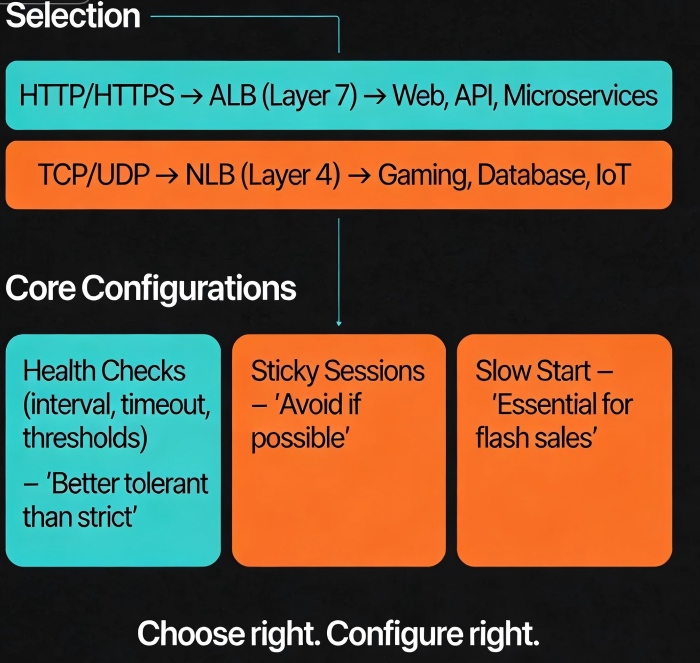
01 Layer 7 or Layer 4? The First Big Decision
Cloud providers offer three main types of load balancers: Layer 7 (HTTP/HTTPS), Layer 4 (TCP/UDP), and sometimes a hybrid. Your choice depends on your traffic and requirements.
Layer 7 (ALB / CLB Layer‑7)
These understand HTTP. They can route based on URL paths, headers, cookies. They support SSL termination, WebSockets, redirects, and rewrites.
Good for: Web applications, API gateways, microservice entry points. Anywhere you need path‑based or host‑based routing.
Not good for: Pure TCP traffic (like database connections, gaming long‑polling), extreme performance requirements (Layer‑7 processing adds overhead).
Layer 4 (NLB / CLB Layer‑4)
These operate at the transport layer. They look at IP and port, not application data. Performance is extremely high, latency is low, and they support millions of concurrent connections.
Good for: TCP/UDP traffic, database proxies, gaming services, IoT ingestion.
Not good for: Scenarios that need URL routing, cookie‑based stickiness, or SSL termination.
Counter‑intuitive truth: Not every workload belongs on Layer 7. Many people default to Layer 7 because “more features must be better.” But Layer‑7 processing can be several times heavier than Layer‑4. For pure TCP traffic, using Layer 7 is just wasting capacity.
Real example: A gaming company used a Layer‑7 load balancer for TCP long‑polling connections. Each instance topped out at 50,000 connections. Switching to Layer‑4 NLB, the same instance handled over a million connections.
02 Core Configurations: Details That Make or Break You
Choose the right type. Then configure it correctly.
Health Checks
This is the most fragile configuration—and the one that affects stability the most.
Interval: Default is 5‑10 seconds. Shorter isn’t always better. Too short adds load and may treat momentary jitter as failure. For most applications, 10 seconds is fine. For latency‑sensitive services, 5 seconds may be appropriate.
Timeout: Usually 1/2 to 2/3 of the interval. If your backend sometimes processes slowly (e.g., during peak load), set timeout generously. A timeout that’s too tight will mark healthy backends as unhealthy.
Healthy threshold: How many consecutive successes before marking a target healthy again. Default is 2‑3. Setting it too low might send traffic to an instance that hasn’t fully warmed up.
Unhealthy threshold: How many consecutive failures before marking a target unhealthy. Default is 2‑3. Too sensitive, and you’ll eject instances for minor hiccups. Too lenient, and you’ll keep failing instances in rotation.
Golden rule: It’s better to keep a questionable target than to eject a healthy one. A questionable target might cause a few slow responses. Ejecting a healthy one can overload your remaining capacity and trigger a cascade.
Sticky Sessions (Session Affinity)
When enabled, all requests from a client go to the same backend. Useful for legacy applications that store session state locally.
But the cost is high: Stickiness can cause load imbalance. One “heavy” user can overload a single backend while others sit idle. Avoid it if you can. If you must keep state, move it to a shared store like Redis. Stateless backends are always better.
Slow Start
Newly registered targets receive a gradually increasing share of traffic, not the full load immediately. This prevents a just‑started instance from being crushed while its caches are cold and its JVM is still warming up.
For flash sales or any traffic surge, slow start is essential. Without it, your freshly scaled instances will get the full traffic spike immediately and likely time out.
03 Common Traps (And How to Avoid Them)
Trap 1: Cross‑zone data transfer charges
Many people don’t realize that cross‑zone traffic can incur charges. If your targets are unevenly distributed across Availability Zones, the load balancer may forward a request from a client in AZ‑A to a target in AZ‑B—and you pay for that cross‑zone transfer. Solution: Place at least one target in each AZ. Then the load balancer can keep traffic local.
Trap 2: Misconfigured connection timeouts
The idle timeout between the load balancer and the backend must be set appropriately. Too short, and long‑running requests get cut off (client sees 504). Too long, and you may accumulate zombie connections. For typical web apps, 60‑120 seconds works. For file uploads or streaming, increase it.
Trap 3: Inconsistent keep‑alive settings
Load balancers often reuse connections to backends. If your backend’s keep‑alive timeout is shorter than the load balancer’s, the backend may close the connection while the load balancer still thinks it’s open. Result: errors. Solution: Match the keep‑alive settings on both sides.
04 Selection Decision Table
| Workload | Recommended Type | Why |
|---|---|---|
| Standard web / API | ALB / L7 CLB | Path‑based routing, SSL termination, rewrites |
| Microservice gateway | ALB / L7 CLB | Header‑based routing |
| TCP long‑polling | NLB / L4 CLB | High performance, massive connections |
| UDP traffic | NLB / L4 CLB | L7 doesn’t support UDP |
| Database proxy | NLB / L4 CLB | Pure TCP, no L7 features needed |
| Global multi‑region | GA / Global Accelerator | Intelligent routing across regions |
| WebSockets | ALB / L7 CLB | Native support |
| gRPC | ALB / L7 CLB | Native gRPC routing; L4 just passes raw bytes |
05 A Real Story: Fixing a Black Friday Near‑Miss
Back to the e‑commerce client. We debugged through the night.
The root cause: health check timeout was 2 seconds, interval 5 seconds, unhealthy threshold 2. During the traffic surge, backend response times occasionally exceeded 2 seconds. The load balancer marked those targets unhealthy. They were ejected, then re‑added after passing a few checks, then ejected again. Traffic oscillated. A cascading failure was imminent.
We adjusted the settings: timeout increased to 5 seconds, interval left at 5 seconds, unhealthy threshold changed from 2 to 3. The health checks stabilized. Traffic balanced again.
The next day, peak traffic was even higher than the night before, but the system held.
Their ops lead later said: “I used to think health checks were just a checkbox. Now I know—set them wrong, and they’re worse than having no checks at all.”
The Bottom Line
A load balancer seems simple—just distribute traffic. But the details matter. Choose the wrong type, and you leave performance on the table. Configure health checks badly, and you destabilize your whole system.
Remember the rules: Prefer Layer 4 unless you truly need Layer 7 features. Make health checks tolerant, not aggressive. Avoid sticky sessions unless you have no other choice. Enable slow start for any scaled event. Watch your cross‑zone traffic.
That ops lead added one more thing: “A load balancer is like the front door of a building. If the door isn’t wide enough, it doesn’t matter how big the rooms are inside.”
How wide is your front door?
