

Cloud Database Backup and Recovery: Don’t Let Your Backups Sleep for Three Years
Last year, a client called me at midnight, voice shaking. “Someone deleted our database. Help me restore it.”
I asked: “Do you have backups?”
“Yes, RDS automated backups. Every day.”
“Then restore it.”
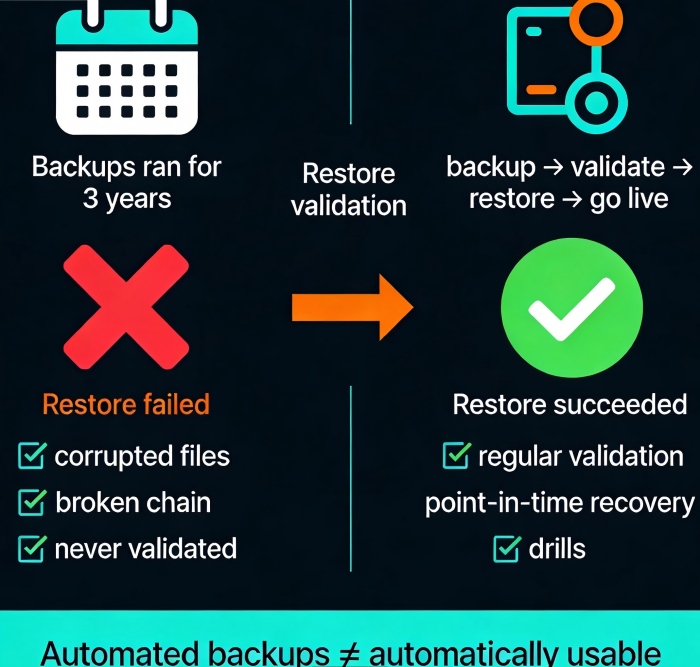
Twenty minutes later, he called back. “It failed. The backup files are corrupted. They’ve been corrupt for three months.”
That night, their team manually recovered from binlogs. They worked until dawn. They lost almost a full day of core orders. The post‑mortem revealed a painful truth: RDS automated backups had been running for three years. No one had ever validated a restore.
This wasn’t RDS’s fault. It was human error.
Today, let’s talk about cloud database backup and recovery. Not the “backups are important” fluff, but practical advice: how to design a strategy, how to validate that your backups actually work, and how to keep your cool when disaster strikes.
01 Automated Backup ≠ Automatically Usable
Many people think enabling RDS automated backups means they’re safe. That’s a dangerous illusion.
RDS automated backups do three things: a daily full backup, continuous incremental backup (transaction logs), and retention for a set number of days. But “backup succeeded” only means the file was written. It doesn’t mean the file is readable. It certainly doesn’t mean you can restore from it.
Counter‑intuitive truth: Automated backups running doesn’t mean you have reliable backups. There’s a gap between “backups are running” and “you can actually restore.” That gap is validation.
That client had three years of backup logs showing “success.” But three months earlier, an underlying storage glitch corrupted the backup files. RDS didn’t report an error—the backup “process” completed. Until the day they needed it, they had no idea their last three months of backups were worthless.
First rule: Regular restore validation is more important than the backup itself.
02 Backup Strategy Isn’t Just “Full + Incremental”
Designing a database backup strategy means answering three questions.
Question 1: How often full backup?
RDS defaults to daily full backups. For small databases, that’s fine. For large databases (multiple terabytes), a daily full backup can be painful—the backup window grows, and it may impact performance. Consider weekly full + daily incremental.
Question 2: How long to keep transaction logs?
Transaction logs enable point‑in‑time recovery (PITR). The longer you keep them, the finer the recovery granularity. But logs cost money, and applying them during recovery is slow. A typical retention is 7‑30 days. For longer needs, rely on full backups.
Question 3: How long to retain backups?
Core business: 30‑90 days
General business: 7‑30 days
Compliance: follow industry rules (e.g., 7 years for finance)
Tiered storage: Keep the last 7 days on hot storage (fast restore). Move 7‑30 days to warm storage. Archive anything older than 30 days to cold storage (cheap but slow restore).
03 Restore Validation: Don’t Wait for an Emergency
How do you verify that your backups actually work? Three methods, ordered by cost and thoroughness.
Method 1: Spot checks
Once a month, pick a non‑critical database. Restore the latest backup to a temporary instance. Run a few queries to see if the data looks sane. Takes 1‑2 hours. Low cost, catches most obvious corruption.
Method 2: Automated validation
Write a script that automatically restores the latest backup to a temporary instance, runs data validation, then destroys the instance. Integrate it into your CI/CD pipeline or a scheduled job. Runs weekly. Higher cost, but continuous coverage.
Method 3: Full disaster recovery drill
Simulate a real production failure: stop writes, restore from backup, validate data, switch traffic. Do this once or twice a year. This catches process and permission issues that spot checks miss.
The client who lost a day of orders? They now run a full DR drill every quarter. The first drill took 4 hours from backup to live traffic. The second: 2 hours. The third: 45 minutes. They now confidently state a 30‑minute recovery time objective (RTO).
04 Point‑in‑Time Recovery: Powerful, But Not Magic
Point‑in‑time recovery (PITR) is one of RDS’s most powerful features. You can restore to any second within the retention window.
But two limitations:
You can only restore to points within your log retention period. If you keep logs for 7 days, you can’t restore to a point 8 days ago.
Recovery time depends on the volume of logs. If you generate hundreds of gigabytes of logs per day, recovery may take hours.
Best practice: Keep at least 7 days of logs for core databases. If your business can tolerate losing at most 5 minutes of data, set log backup frequency to 5 minutes. 1 minute is even better, but the performance overhead on RDS is higher.
Counter‑intuitive truth: PITR isn’t infinite and isn’t instant. Before you need it, understand the limits and estimate the recovery time. Don’t learn these lessons during an outage.
05 Common Traps (And How to Avoid Them)
Trap 1: Backing up the database, but not the configuration
You restore the database—but user permissions, parameter groups, and alerts are gone. RDS can restore with the original parameter group if you choose that option, but manual snapshots need extra care. Solution: manage database configuration (IAM, parameter groups, alarms) as infrastructure as code.
Trap 2: Underestimating cross‑region backup costs
Cross‑region backup doubles your storage cost and adds data transfer fees. Enable it only for truly critical databases.
Trap 3: Backup window overlapping peak hours
RDS picks a random backup window by default. Check it. Move it to off‑peak hours. Backups increase I/O, which can affect latency‑sensitive workloads.
Trap 4: Forgetting to encrypt backups
RDS backups inherit the encryption setting of the source instance. If your instance is encrypted, backups are encrypted. But manual snapshots need explicit confirmation. Check: are all backups, snapshots, and cross‑region copies encrypted?
06 A Real Story: Backups Saved Them—Almost
Last year, an e‑commerce client accidentally deleted a product table during a flash sale. They had RDS automated backups with 7 days of log retention. They performed a point‑in‑time restore to one second before the deletion.
Restoration worked perfectly. The data came back.
But they forgot one thing: the product table had an auto‑increment primary key. New orders had been placed during the incident window. The restored table’s primary keys conflicted with the new orders. They spent half a day manually merging data. The sale page was degraded for hours.
Lesson: Recovery isn’t just “go back in time.” You also have to handle new data created during the incident window. Design your recovery plan to include merging or replaying that data. A common pattern: restore to a new instance, compare with the current instance, merge, then cut over.
The Bottom Line
Database backups are invisible when they work. When they don’t, there’s no second chance.
The client who lost a day of orders now runs automated restore validation weekly and full drills quarterly. Their backup strategy has also changed: cross‑region backup for critical databases, 30 days of log retention, annual archiving to cold storage.
Their security lead later said: “I used to think backups were about buying insurance. Now I think backups are about buying insurance that actually pays out. And whether it pays out is up to us.”
When was the last time you restored one of your database backups? Pick a non‑critical database this week. Restore it to a temporary instance. See if the data looks right.
It might take half a day. But it could save you from a sleepless night.
Because once data is lost, it stays lost.
