

Cloud Data Lifecycle Management: From Creation to Deletion – Stop Data from Becoming a Liability
Last year, a financial client failed an audit. The auditor asked: “You have three‑year‑old transaction logs. Show me the deletion records for logs older than seven years.” The client had no deletion records. They had never set up a deletion policy.
They weren’t keeping the data because they needed it. They were keeping it because they didn’t know how to safely delete it.
Three months later, they had built a data deletion process. But during those three months, they kept paying for storage they didn’t need.
This is the awkward truth of data lifecycle management: keeping data costs money. Not knowing how to delete it costs even more.
Today, let’s talk about cloud data lifecycle management. Not the “data is important” fluff, but a practical guide: when to keep data hot, when to move it cold, when to delete it, and how to delete it without failing an audit.
01 Not Every Byte Needs to Stay Forever
Many people assume: keeping data can’t hurt. That’s the biggest cost trap.
Data accessed once and never again sits in hot storage, burning money.
Data past its compliance retention period is a liability (breach risk, audit questions).
Duplicate, stale, or test data is pure waste.
Counter‑intuitive truth: Data is not an asset. It’s a liability. Every byte has storage cost, management cost, security cost, and compliance cost. The sooner you delete unnecessary data, the better.
That financial client kept seven years of transaction logs. Compliance required seven years. But logs older than six months were never accessed. They were stored in hot storage for years. After they moved data to a lifecycle policy—hot for 6 months, warm for 6‑12 months, cold for 1‑7 years, delete after 7 years—their storage bill dropped by 60%.
02 The Five Phases of Data Lifecycle
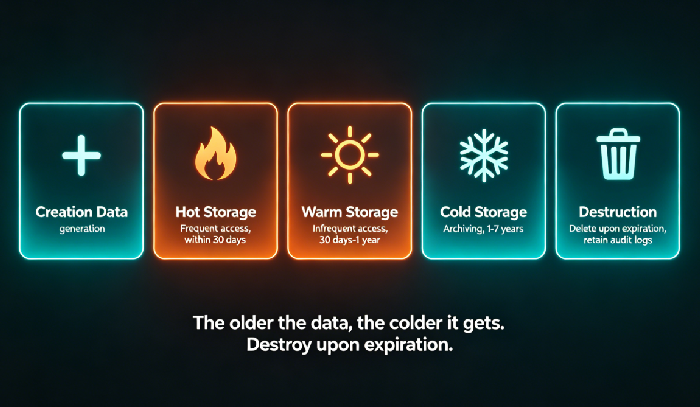
Data typically passes through five stages from creation to deletion.
Phase 1: Creation
Data is born. A user upload, a log write, a transaction record.
Phase 2: Hot storage (frequent access)
Data is actively used. Needs millisecond access. Store in hot tier (Standard). Examples: last 7 days of orders, last 30 days of user activity.
Phase 3: Warm storage (infrequent access)
Data is rarely accessed but still needs reasonably fast retrieval. Store in warm tier (Infrequent Access, Intelligent‑Tiering). Examples: last month’s reports, last year’s project docs.
Phase 4: Cold storage (archive)
Data is almost never accessed but must be retained for compliance. Store in cold tier (Archive, Glacier). Retrieval may take minutes to hours. Examples: logs from three years ago, audit records.
Phase 5: Deletion
Data is past its retention period or no longer needed. Delete it permanently and irreversibly. Deletion must be auditable—proof that you deleted it.
The principle: Older data moves to colder storage. Expired data gets deleted.
03 Storage Tiers: Hot, Warm, Cold, Archive
Cloud providers offer distinct storage tiers. Choose by access frequency and cost.
Hot (Standard)
Use for: frequent access, millisecond response
Cost: highest
Typical retention: up to 30 days
Warm (Infrequent Access / Intelligent‑Tiering)
Use for: accessed a few times per month, but fast retrieval needed
Cost: lower storage, retrieval fee applies
Typical retention: 30 days to 1 year
Cold (Archive / Glacier)
Use for: accessed once a year or less, compliance retention
Cost: very low, but slow retrieval (minutes to hours)
Typical retention: 1 to 7 years
Deletion
After retention period expires, automatically delete
Requires audit log to prove deletion
That financial client used S3 lifecycle policies to automate the flow: move to Infrequent Access after 30 days, move to Glacier after 180 days, delete after 7 years. Fully automated. No human intervention needed.
04 Archiving: It’s Not “Set and Forget”
Many people think archiving means dumping data into cold storage and forgetting it. But archiving has traps.
Trap 1: Retrieval costs
Cold storage is cheap to store, but expensive to retrieve. If you archive data that needs to be retrieved frequently, retrieval fees may exceed the savings. Before archiving, ask: “Will I need this within a year?”
Trap 2: Retrieval time
Cold storage retrieval can take hours. If you need the data urgently, you can pay for expedited retrieval—but that costs more. Before archiving, ask: “If I suddenly need this, can I wait hours?”
Trap 3: Minimum retention periods
Cold storage tiers often have minimum billing periods (e.g., 180 days). If you delete data before that, you still pay for the full period. Before archiving, ask: “Can this data stay here for at least 180 days?”
05 Compliant Deletion: Deleting Is Harder Than Storing
Deleting data sounds simple—press a button. But in a regulated environment, compliant deletion is harder than storage.
Three questions compliant deletion must answer:
Was the data really deleted? (irrecoverable)
When was it deleted? (timestamped)
Who authorized the deletion? (auditable)
How to do it:
Use “object lock” or “compliance retention” to prevent deletion before the retention period ends.
After the retention period, automatically delete the data. The deletion operation must be logged.
Regularly export deletion reports to prove compliance.
The financial client failed their audit because they couldn’t answer the third question. After the audit, they configured S3 lifecycle policies with deletion logging to CloudTrail. The next audit, they exported the logs and showed: “Data older than 7 years was deleted on this date, by this policy.”
06 A Real Story: From Cost Hole to Audit‑Ready
A healthcare client stored 10 years of patient imaging data. Compliance required 10 years of retention. Data older than 10 years had to be destroyed. But they had never destroyed anything—they were afraid of deleting the wrong data.
Costs grew 30% every year. Data from 10 years ago still sat in hot storage.
We helped them do four things:
First, classify data by age. Hot: last 1 year. Warm: 1‑5 years. Cold: 5‑10 years.
Second, automate tiering. Lifecycle policy: move to warm after 1 year, to cold after 5 years, delete after 10 years.
Third, enable deletion logging. Every deletion recorded. Monthly deletion reports exported.
Fourth, enable object lock. During the retention period, data could not be altered or deleted.
One year later, storage costs dropped by 70%. The next compliance audit passed with no findings. Their tech lead said: “Data used to be a burden. Now it’s an asset—when you manage it correctly.”
The Bottom Line
Data lifecycle management isn’t a technical problem. It’s a governance problem. When to keep, when to move, when to delete, and how to prove you deleted it—that’s the core.
That financial client’s ops lead summed it up: “I used to think more data was better. Now I think keeping data past its expiration is worse than never collecting it at all.”
Your data—are you managing it, or is it managing you?
