

Cloud Resource Quotas and Capacity Alerting: Don’t Let One App Eat All Your Resources
Last year, a client called me at midnight, panicked. “Our production environment is down. Everything is timing out. But our traffic hasn’t spiked.”
I logged into their console. CPU and memory were completely saturated. I drilled down. A test environment application had been misconfigured and was running at 100% CPU. The problem? Their test and production environments shared the same resource pool. The test app consumed all the CPU, and production starved. Everything collapsed.
This is the silent killer of multi‑tenant environments: a single application or team can consume all available resources and take down everyone else.
Today, let’s talk about cloud resource quotas and capacity alerting. Not the “quotas are important” fluff, but a practical guide: how to prevent one app from going rogue, how to set quotas, how to choose quota values, and how to alert before it’s too late.
01 Quotas Aren’t Restrictions – They’re Protection
Many people hear “quota” and think “limitation.” That’s a misunderstanding.
Quotas aren’t there to limit you. They’re there to protect everyone else. One app consuming unlimited resources means other apps can’t run. One team over‑using capacity means other teams wait.
Counter‑intuitive truth: A system without quotas is like a highway without lanes. One car can swerve across all lanes and block everyone.
That client’s problem was exactly this: no quotas. Test and production shared the same pool. The test app consumed all the CPU, and production was starved. With a quota, the test environment would have been limited to, say, 30% of CPU, leaving 70% for production. The outage would never have happened.
02 Where to Set Quotas
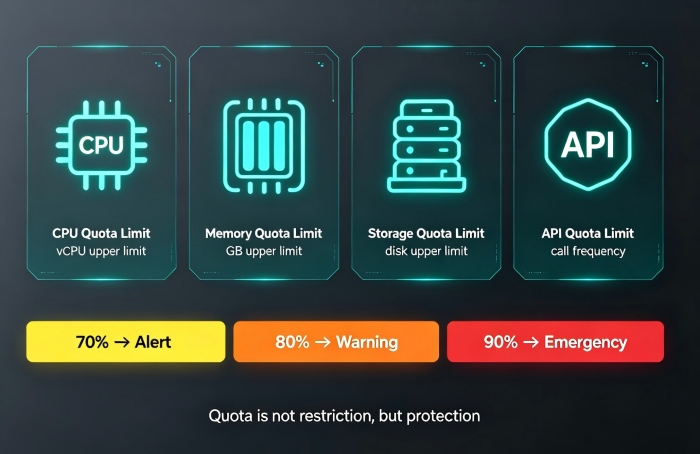
Cloud quotas typically cover four dimensions.
CPU quotas – Limit the maximum number of vCPUs. Prevents a single app from pegging all cores.
Memory quotas – Limit the maximum gigabytes of RAM. Prevents a memory leak from taking down a node.
Storage quotas – Limit the maximum disk usage. Prevents log files or backups from filling up the disk.
API call quotas – Limit the number of API calls per second. Prevents a single app from overwhelming a shared service.
In Kubernetes: Use ResourceQuota per namespace. For example, the dev namespace can use at most 20 CPU cores and 40GB of memory.
At the cloud account level: AWS Service Quotas, Azure subscription limits. Prevents a single account from creating unlimited resources.
03 How Much Quota? Three Principles
Quotas aren’t guessed. They’re calculated based on business needs.
Principle 1: Tier by environment
Production: Most generous quotas, but with early alerts. Example: reserve 70% of total capacity for production, keep 30% as a buffer.
Staging: Moderate quotas, isolated from production.
Test/Development: Strict quotas to prevent waste. Example: a single developer namespace gets at most 2 CPU cores, 4GB of memory.
Principle 2: Tier by business priority
Core business: High quota, low alert threshold.
Non‑core business: Lower quota, higher alert threshold.
Batch jobs: Low quota, but allowed to “borrow” idle capacity when available.
Principle 3: Reserve a buffer
Never allocate 100% of your capacity. Keep at least 20% as a buffer for traffic spikes, emergency scaling, or unexpected workloads.
After the outage, that client set quotas: production guaranteed 70% of resources, test environment capped at 20%, with 10% buffer. They never again had a “test kills production” incident.
04 Capacity Alerting: Tell Me Before I Hit the Limit
A quota is a hard stop. When you hit it, requests are rejected. But a hard stop can hurt your business.
Better approach: alerting + quota
70% warning: “You’re approaching your quota. Plan to clean up or request an increase.”
80% critical: “You’re close to the limit. Take action soon.”
90% emergency: “You will hit the limit soon. Auto‑scale or degrade gracefully.”
Alerts are more important than quotas. Quotas are the last line of defense. Alerts give you time to act.
Cloud providers offer quota alerting:
AWS: CloudWatch alarms on Service Quotas.
Azure: Subscription usage alerts.
Kubernetes: Kube‑state‑metrics + Prometheus to monitor namespace usage against ResourceQuota.
05 Capacity Forecasting: Tell Me Next Week
Real‑time alerts are essential, but they’re not enough. If an application’s resource usage grows 5% every day, it will hit its quota in a week. You need capacity forecasting.
How to do it:
Collect historical usage data (last 30 days).
Aggregate by day, calculate the daily growth rate.
Fit a trend line and predict when usage will hit the quota.
Notify the team: “You have 5 days left. Optimize or request an increase.”
Tools: Prometheus + a custom script, or cloud‑native forecasting (AWS Forecast, Azure Monitor predictive alerts).
That client added forecasting alerts: when the model predicted a quota hit within 7 days, the team was notified. Their ops lead said: “We used to fight fires. Now we get a week’s notice.”
06 A Real Story: Quotas Saved a Flash Sale
An e‑commerce client planned capacity for a flash sale. They assigned quotas to every service. On the day of the sale, the recommendation service suddenly saw a massive traffic spike, hitting 120% of its CPU quota.
In the old world, it would have consumed resources from other services, slowing down the order service and causing a cascade failure.
But because quotas were in place, the recommendation service was throttled at its limit. It used its allocated resources and no more. The order service stayed fast and stable. The flash sale completed without a hitch.
In the post‑mortem, their ops lead said: “Quotas saved us. Not because they stopped the recommendation service from failing—but because they stopped it from taking others down with it.”
The Bottom Line
Resource quotas and capacity alerting aren’t about restricting you. They’re about protecting everyone.
That client’s ops lead later said: “I used to see quotas as handcuffs. Now I see them as seatbelts. You can drive without one—but if you crash, you’ll wish you’d buckled up.”
Does your system have quotas? Or are you one misconfigured app away from a full outage?
