

Graceful Shutdown and Zero‑Downtime Deployment: Stop Dropping User Connections on Restart
Last year, an e‑commerce client deployed a new version during a flash sale. Their deployment script was simple: kill -9 the old process, start the new one. For a few seconds during the restart, active user connections were dropped. Users who were in the middle of paying saw their orders fail. The help desk was flooded.
Their tech lead said: “We just restarted the service. How could that break things?”
This is the common misunderstanding about restarts: You restarted your process. But users were still connected.
Today, let’s talk about graceful shutdown and zero‑downtime deployment. Not the “be careful with restarts” fluff, but a practical guide: how to stop a service without dropping user connections, and how to deploy new versions without losing a single request.
01 Why a Direct Restart Drops Connections
A running process may have hundreds or thousands of active connections. Each of those connections may be handling an in‑flight request.
kill -9 terminates the process immediately. No cleanup. The operating system forcibly closes all connections. The client sees “connection reset.”
Result: Users in the middle of paying, uploading, or commenting get cut off. Bad experience.
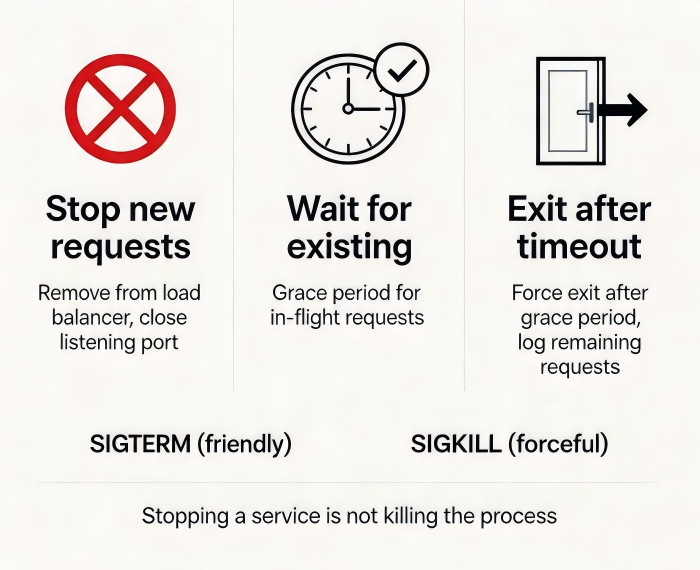
Counter‑intuitive truth: Stopping a service isn’t about killing the process. It’s about letting the process clean up and exit on its own.
02 Graceful Shutdown: Give the Process Time
Graceful shutdown means: first tell the process “prepare to stop,” give it time to finish its work, then let it exit.
Step 1: Send SIGTERM, not SIGKILL
SIGTERM(signal 15): “Please shut down gracefully.” The process can catch this signal and perform cleanup.SIGKILL(signal 9): Forcefully kills the process with no chance for cleanup. Use only as a last resort.
Step 2: The process does three things
Stop accepting new requests. Remove itself from the load balancer, or close its listening port.
Wait for existing requests to complete. Give in‑flight requests a grace period to finish.
Exit after timeout. If the grace period expires and some requests are still pending, log them, then exit.
Kubernetes configuration:
terminationGracePeriodSeconds: How many seconds the pod has to clean up. Default is 30 seconds.preStophook: A command executed just before the pod is terminated. Used to signal the load balancer to stop sending traffic, wait for connection draining, etc.
Example:
yaml
spec:
  containers:
  - name: myapp    lifecycle:
      preStop:
        exec:
          command: ["sleep", "10"]
  terminationGracePeriodSeconds: 30
03 Connection Draining: Tell the Load Balancer to Let Go
Even after the process stops accepting new requests, the load balancer may still send traffic to it, unaware that it’s shutting down.
Connection draining solves this:
The load balancer detects that a target is about to go offline. It stops sending new requests to that target.
Existing connections are kept alive. They are allowed to finish naturally.
After the drain timeout, any remaining connections are forcibly closed.
AWS NLB/ALB: Target groups have a “drain timeout” setting. Default is 5 minutes.
Kubernetes Service: When a pod stops, the endpoint controller removes it from the Service. Existing connections are not broken—they are handled by the application layer.
04 Traffic Warm‑Up: Don’t Slam a Fresh Pod
A freshly started pod has a cold JVM, empty caches, and cold connection pools. Sending full production traffic immediately will likely cause timeouts.
Traffic warm‑up means: start the new pod with a small amount of traffic, then gradually increase to the normal level.
Kubernetes implementation:
readinessProbe: The pod joins the Service only after it’s ready. You can set an initial delay to allow for warm‑up.
Blue‑green deployment: Test the new environment with a small amount of traffic, then cut over.
Canary release: Start with 1% of traffic, then slowly increase.
The e‑commerce client’s improved flow:
New version deployed.
readinessProbeconfigured with a 30‑second initial delay (for JVM warm‑up).readinessProbesucceeded; the new pod joined the Service.Old pod received SIGTERM, slept for 10 seconds to allow connection draining, then exited.
The entire process was invisible to users.
05 Common Pitfalls and Solutions
Pitfall 1: preStop doesn’t execute
Check: preStop runs when the pod is terminated. It runs before SIGTERM. Ensure it doesn’t take longer than terminationGracePeriodSeconds.
Pitfall 2: terminationGracePeriodSeconds is too short
You give the pod 30 seconds, but cleaning up database connections takes 40 seconds. The pod is killed halfway. Solution: increase the grace period or optimize cleanup logic.
Pitfall 3: Load balancer drain timeout is shorter than the process’s grace period
Load balancer drains for 5 minutes. The process exits in 30 seconds. The load balancer continues waiting for connections that no longer exist. Make sure the drain timeout ≤ the process’s termination grace period.
06 A Real Story: From Dropped Connections to Invisible Deployments
That e‑commerce client transformed their deployment process.
First, they changed from kill -9 to kill -15 (SIGTERM). Their application caught the signal, stopped accepting new requests, and waited for in‑flight requests to complete.
Second, they added a preStop hook: sleep 10. This gave the load balancer time to remove the pod.
Third, they enabled connection draining on their AWS NLB with a 60‑second timeout.
Fourth, they added a readinessProbe with a 30‑second initial delay. New pods warmed up their JVM and caches before accepting traffic.
The next flash sale, they deployed multiple times. No dropped connections. No user complaints. Their ops lead said: “Deployments used to feel like defusing a bomb. Now they feel like changing a lightbulb.”
The Bottom Line
Graceful shutdown isn’t technically hard. But it’s often overlooked. Teams focus on the deployment pipeline and forget that during those few seconds of restart, users are still connected.
That client’s ops lead summed it up: “I used to think a deployment was about replacing the version. Now I know it’s about replacing the version without the user ever noticing.”
Does your deployment drop connections? Or are your restarts invisible?
